Debugging Server Connections in Scribe
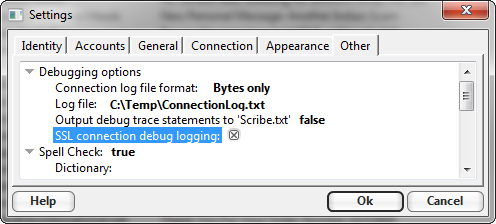
This tutorial shows how to deal with an issue connecting to a server to send or receive email.If you are using v2.0.65/v2.1.x or later and having trouble with a connection that uses SSL you should turn on SSL debug logging in the "Other" tab of the Options:
 Then to see the dialog between the client and server, open out the status panel by
clicking the "+" symbol to the right on the toolbar:
Then to see the dialog between the client and server, open out the status panel by
clicking the "+" symbol to the right on the toolbar:
 That will show the accounts list like this:
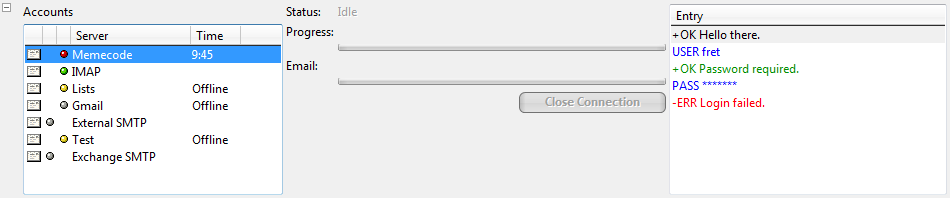 The problem account should have a red dot next to it. i.Scribe will only show one account here,
but InScribe may have many like this. Click on the account you are having trouble with. The connection
log will appear in the right most pane. If you want to send me the log messages, right click on the
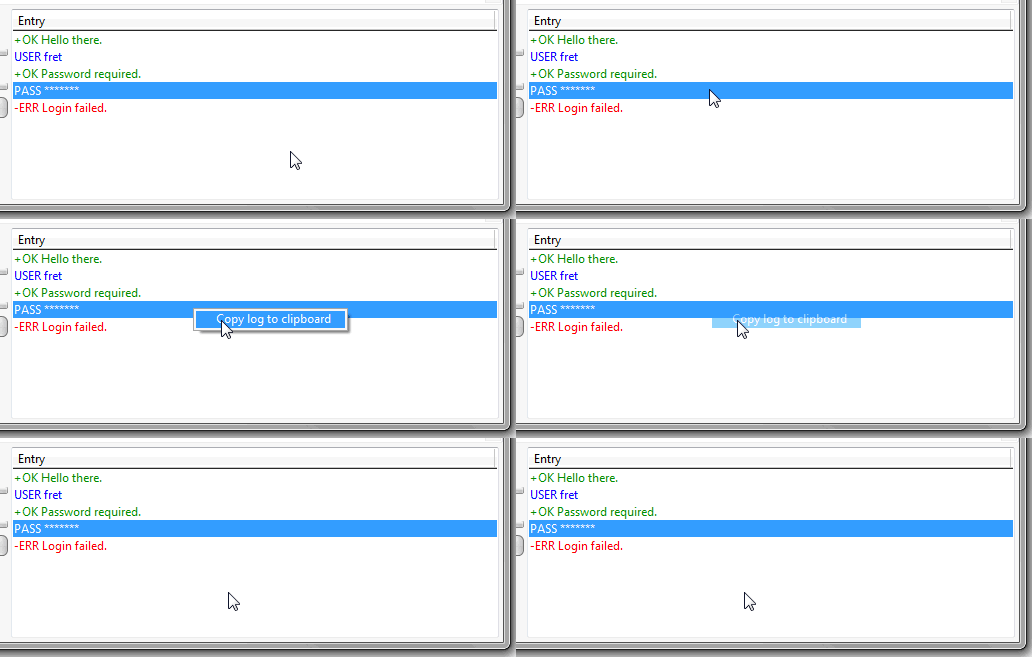
log entries and select "Copy to clipboard" like this:
The problem account should have a red dot next to it. i.Scribe will only show one account here,
but InScribe may have many like this. Click on the account you are having trouble with. The connection
log will appear in the right most pane. If you want to send me the log messages, right click on the
log entries and select "Copy to clipboard" like this:
 Have a read though the messages and see if anything makes sense. Sometimes the error is obvious at this
point and you can fix the issue yourself. Otherwise you can forward the log to me so that I can help you.
Have a read though the messages and see if anything makes sense. Sometimes the error is obvious at this
point and you can fix the issue yourself. Otherwise you can forward the log to me so that I can help you.